

LibreCAD
Read our comprehensive review of LibreCAD, the open-source 2D CAD design software. Discover how this free tool simplifies complex technical drafting.
An Honest Review of LibreCAD 2D CAD Design Software
Finding a reliable, cost-effective platform for technical drafting can be a challenge. Enter LibreCAD 2D CAD design, a fully free, open-source application built specifically for creating precise two-dimensional blueprints, schematics, and layouts. Developed by the dedicated LibreCAD Developers, this software serves as a lightweight yet capable alternative to heavy, expensive drafting suites, making it highly accessible for Linux users.
What Can You Actually Create with LibreCAD?
Unlike general illustration tools, this application is engineered strictly for geometric accuracy and engineering standards. Here is a look at what you can build with its comprehensive toolset:
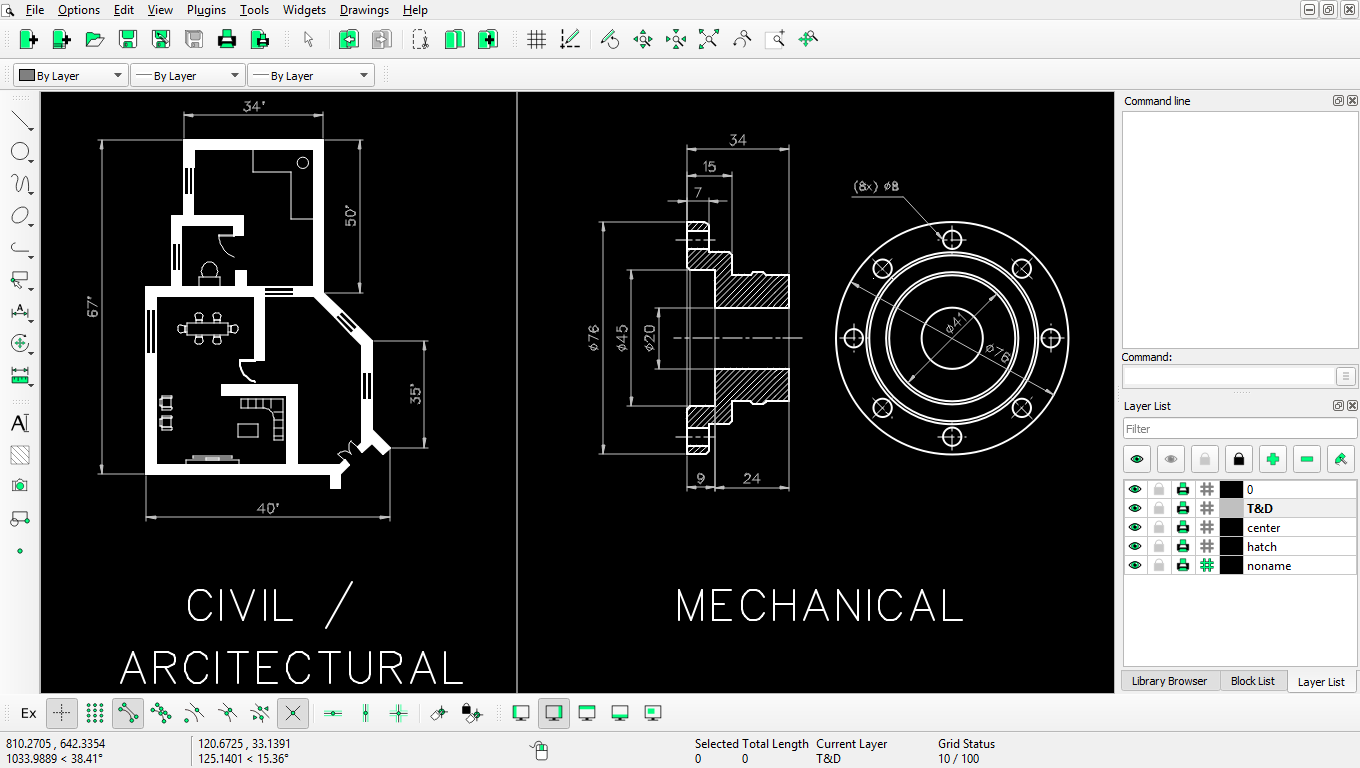
- Architectural Floorplans: Design detailed room layouts, electrical schematics, and structural framing guides with exact scale measurements.
- Mechanical Part Designs: Draft precise component blueprints, complete with complex curves, angles, and dimensions for manufacturing.
- Product Prototyping: Visualise flat, 2D representations of physical goods before moving them into production phases.
Who is LibreCAD 2D CAD Design For?
This software is highly suited for self-employed contractors, students, and makers who need an uncluttered environment for geometric sketching. Because it focuses entirely on two-dimensional drafting, the interface avoids the overwhelming complexity of 3D modeling programs. If your workflow relies on flat blueprints rather than spatial rendering, this tool provides a streamlined workspace to get your projects drawn quickly and accurately.
Key Features for Precision Drafting
The strength of LibreCAD 2D CAD design lies in its targeted utility. Notable highlights of the application include:
- Advanced Snapping System: Align your lines, circles, and arcs perfectly to grids, endpoints, or intersections to ensure mathematical precision.
- Layer Management: Organise complex drawings by placing different elements—such as dimensions, text, and structural outlines—on separate, toggleable layers.
- No Licensing Costs: As a fully open-source project, you gain access to professional-grade drafting tools without subscription fees or hidden paywalls.
Our Verdict: A Reliable 2D Drafting Companion
For Linux users seeking a dedicated design application, LibreCAD delivers exceptional value. It remains focused on doing one thing incredibly well: producing clean, accurate 2D technical drawings. To explore this powerful open-source drafting tool for your own projects, visit the official Flathub store page to get started.